
Bad Drive???
Don't stress! We will work with you to get you your photos and either fix the drive or replace it ASAP. Glacier Bay is an extraordinary place, and we sell these photos and captions to help share our experiences with all of you. We don’t want a simple electronic malfunction to diminish your experience. If a replacement is needed, we’ll send a new drive—personally tested by one of us—as quickly as possible, usually within a day or two. In the meantime, all the photos and captions can be viewed via the Web Access link.
Troubleshooting
Bad drives are rare but they do happen. Please help us understand exactly what is going wrong. Plug the drive into a computer and use the file explorer to look for the drive. It should show up as either the D: or E: drive. Perhaps another letter if you have many hard drives. Does the drive show up? Unfortunately in 2026 some drives show up as "NO NAME" in some systems, but they are still there!!!! If it shows up, can you click on it and see if there are any files at all? If the operating system shows an error associated with the drive letter please let us know what that error is. Next step is to email us and tell us exactly what happens when you plug the drive into a computer.
Contact Us
To request a replacement send us an email with a note that tells us:
- the day/month/year the drive was purchased
- the location or ship where you purchased it
- if it is a blue or red drive
- what happened when you were troubleshooting
- your physical mailing address
If your mailing address is in the USA send your email to seanneilson@gmail.com
If your mailing address is outside the USA send your email to support@glacierbayexplorer.com
No receipt is necessary. We'll get back to you as soon as possible but we live next to Glacier Bay and sometimes we are out exploring. Please be patient.
What You Will Recieve and Return to Us
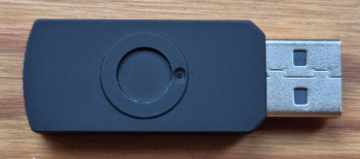
You will recieve the electronics and plastic body of the flash drive, not the complete drive (photo above/right). You can easily remove the metal outer swivel from the bad drive and put it on the new body. We may send you an addressed, stamped envelope for you to return the bad drive body to us.
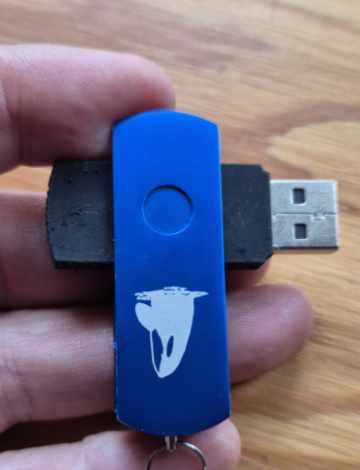
To remove the swivel, hold the drive so you are viewing the back, the part with the little dimple. Open the drive as in the photo above/right by using your index finger to slightly separate the metal ends. Use your other hand to work the black body upward. To put the new body on make sure the sides with the dimples match and are aligned.
